Hot Spotter v0.75.0

NAIL YOUR MUSIC'S LOUDNESS & SPECTRUM

Spot the heat before your listeners do.

Drop a folder of masters and see the whole album on one screen. Loudness-tinted waveforms show exactly where a track runs hot — not just that it does.

Download See it read a real album ↓

Scan 20 tracks for free · WAV · AIFF · FLAC · MP3

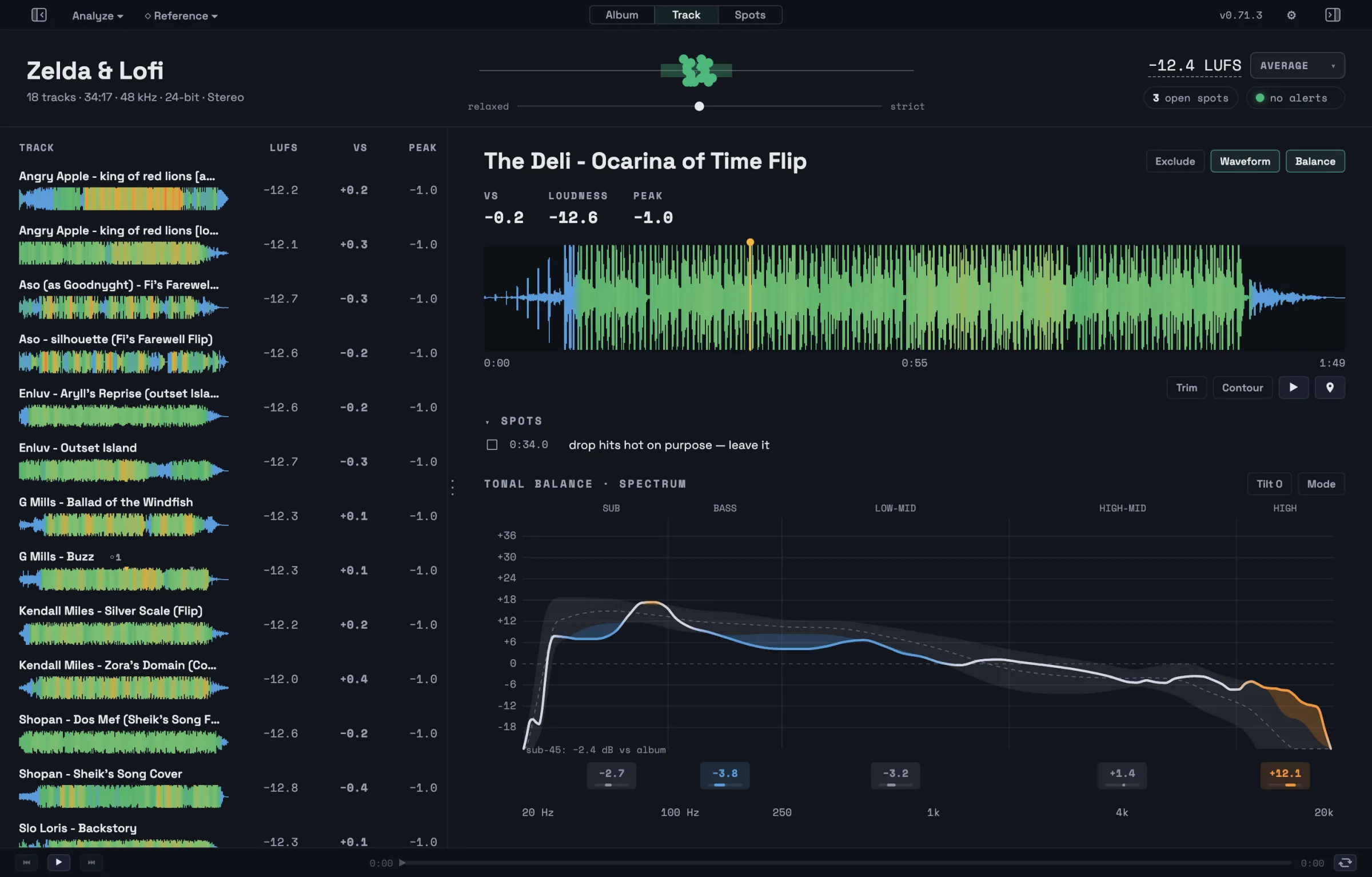
Hot Spotter's Track Details view: a tracklist of 18 tinted waveforms on the left, and the focused track "The Deli — Ocarina of Time Flip" with its loudness-tinted waveform, LUFS stats and a spot note on the right.
Real loudness-tinted waveform strip: blue where the track sits quiet, green with the album, amber where it runs hot
runs quiet hits the average level running hot

HOW IT WORKS

Scan your album, or your entire discography, in seconds.

  1. Drop your mixes or masters.

    Drag the album folder onto Hot Spotter. It analyzes WAV, AIFF, FLAC and MP3s with an industry-standard engine (integrated LUFS, EBU R 128), all on your machine. No cloud, fully functional offline.

  2. Read the room.

    Every track is measured against your album's own average, or a reference or target you set. Tracks that drift louder or quieter get flagged for your review, and the tinted waveform shows exactly which sections do it.

  3. Fix mistakes, lock in intention.

    Bounce a new master or confirm a track is how you like it, then hit Analyze Again. Every change is tracked in History, so you can watch your album's levels take shape.

WHAT IT IS

More than a LUFS meter: your album, or your entire discography.

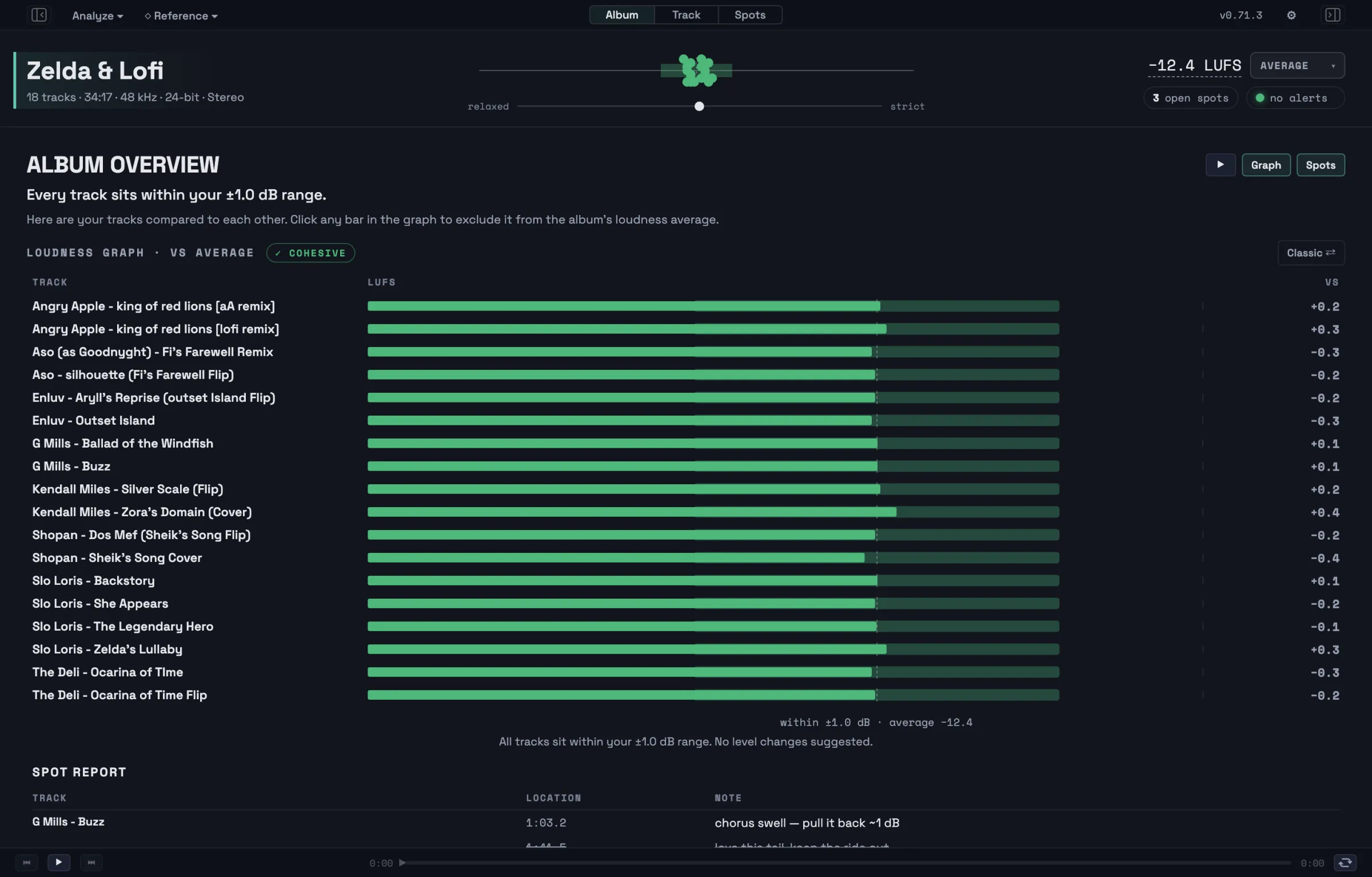
Overview: a loudness bar graph of 18 tracks around the album average of −12.4 LUFS, with the Spot Report table below.
18 tracks scanned and compared in a single sortable view.

OVERVIEW

Every track's loudness against your album's average

Load up the Overview for one graph of the whole record. Each track's loudness shows as a bar around the album's average, flagging the ones that leave the pack. Leave notes for your mixes and see them at a glance in the Spot Report underneath.

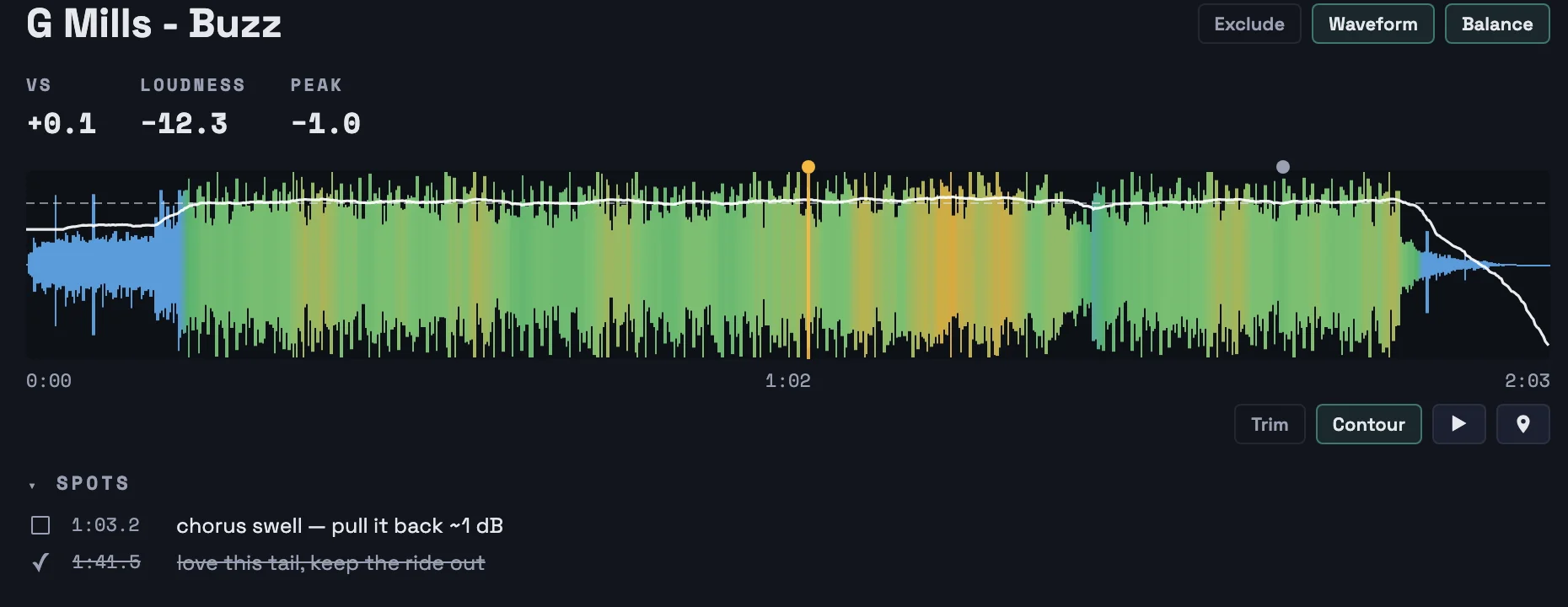
A loudness-tinted waveform of G Mills — Buzz with a white short-term-loudness contour line, stats row above and two spot notes below.
G Mills — "Buzz": contour line over the tint, two spot notes below.

TINTED WAVEFORM & CONTOUR

DJ-style waveforms show loudness and peaks visually, making finding hot spots a breeze.

Short-term loudness is color-coded on the waveform. Green while a track sits with the album, amber to red where it gets loud, blue where it dips quiet. Toggleable contour with a hover feature for details.

Leave mix notes right on the waveform with timestamps using the "Spots" feature. Export your notes for an engineer, or copy the timestamped list to work through in your DAW.

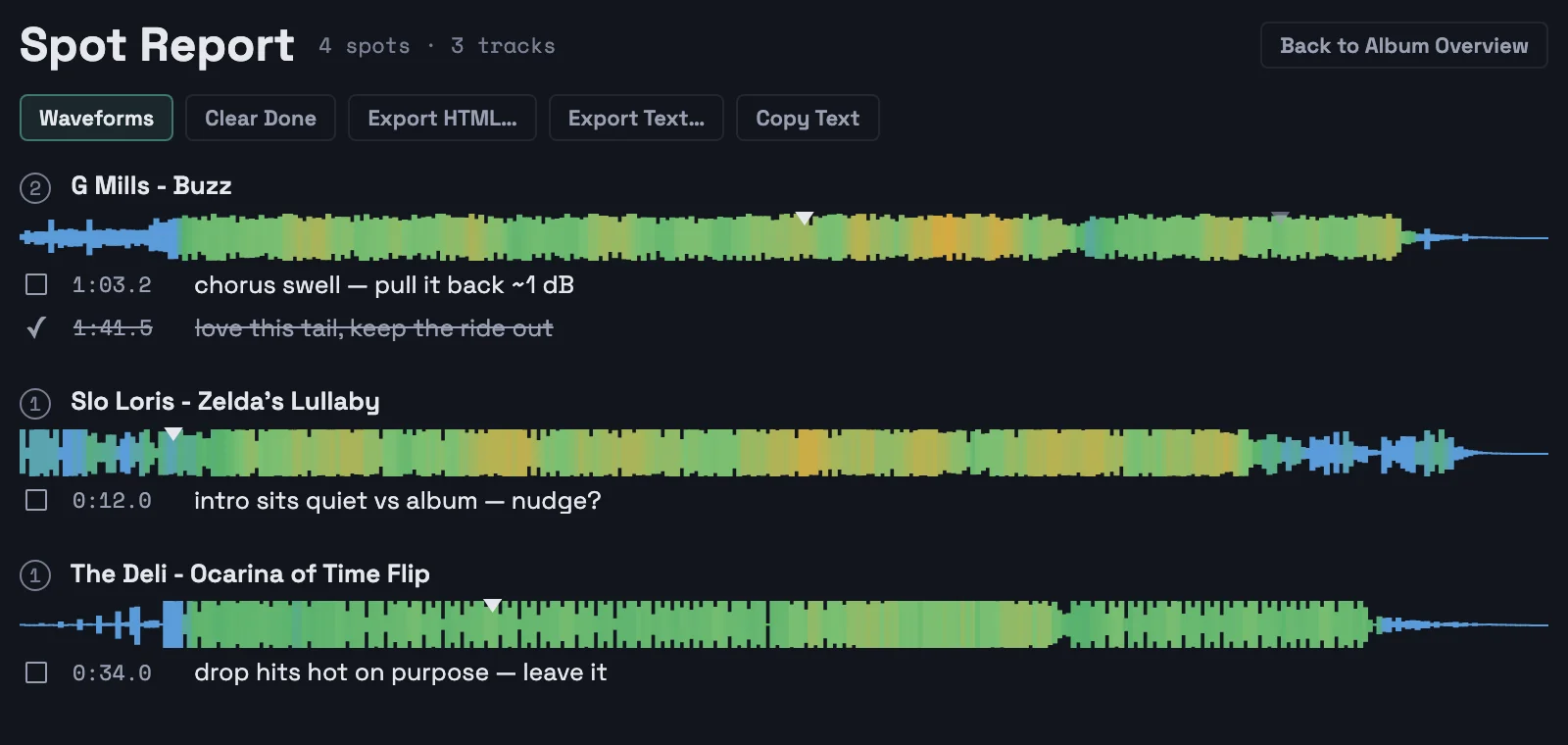
The Spot Report view: tinted waveform strips for three tracks with timestamped notes, one checked off with a strikethrough.
A seamless way to provide mix feedback for yourself and collaborators while listening back to the mixes.

SPOT REPORT

Precise note-taking for mixes & feedback

Hear something? Tap "P" to mark a spot in the Spot Report. Leave notes that automatically include the timestamp for quick and easy mix refinement.

Analyze again, double-check, and knock them off your list. And if you're collabing, you can quickly export the Spot Report to a file, or even to your clipboard, to paste into a chat app like iMessage or Discord.

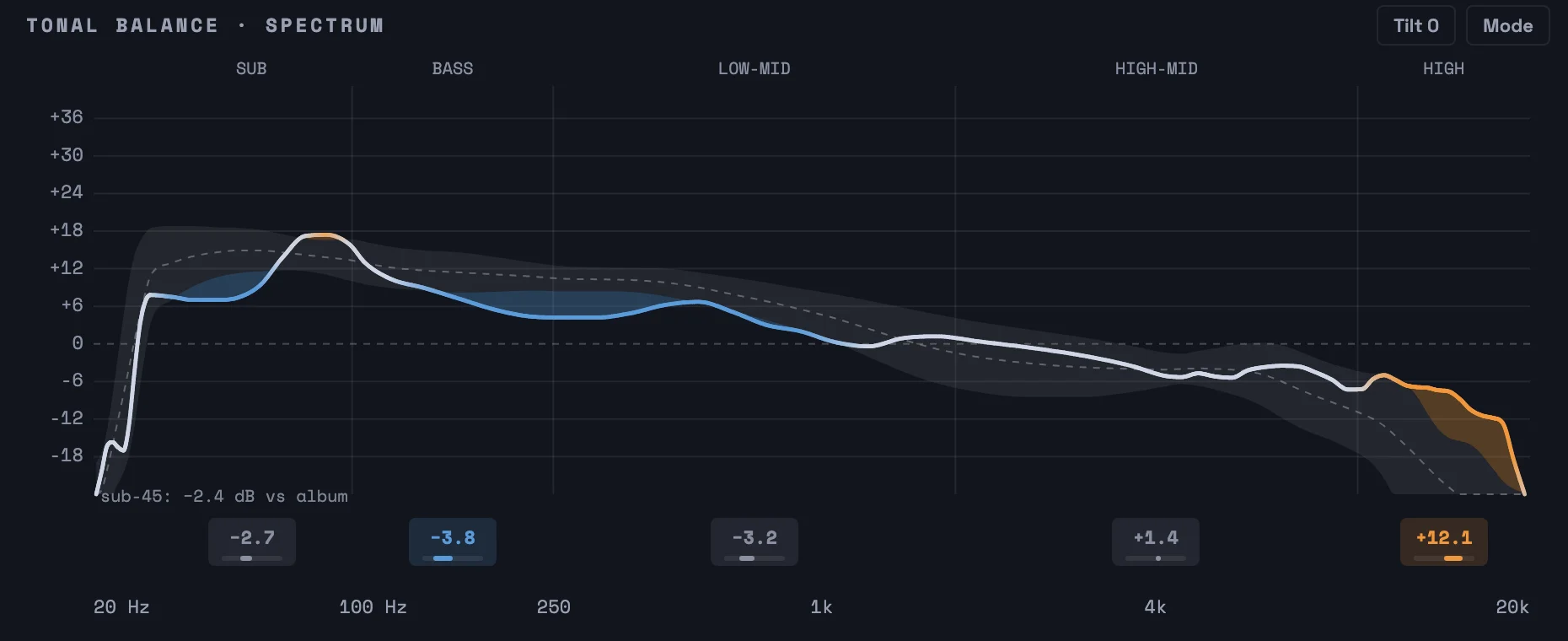
A spectrum curve overlaid on the album's typical range band, with per-band deviation chips from sub to high.
Tonal balance — one track's spectrum against the album's band.

VIEW YOUR AUDIO SPECTRUM

Keep your tracks balanced with a color-coded spectrum analyzer

Every track features a spectrum against the album's own spread — sub, bass, low-mids, high-mids and highs each get a verdict in dB. No more guessing between "boomy" and "muddy", everything in view.

MAKE IT YOURS

Seven palettes. Dark or light.

Every waveform, graph and chip in the app follows the palette you pick. Thermal is the default.

NO PRESET POLICE

A loudness meter for producers, indie musicians, and DJs.

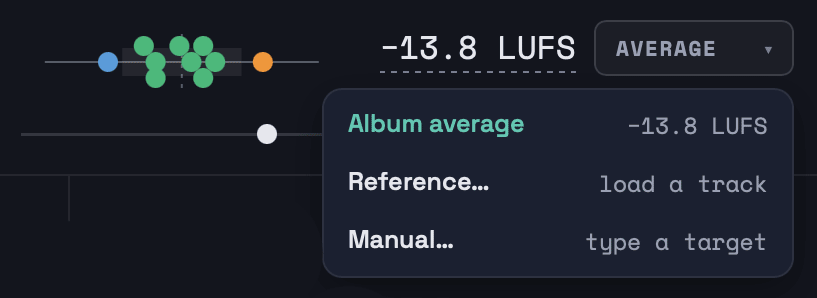
The Average menu: Album average at −13.8 LUFS, Reference (load a track), or Manual (type a target), with the leniency slider beside it.
Pick your reference: the album itself, a track you love, or a platform's recommendation like Spotify's −14 LUFS.

Hot Spotter doesn't grade you against a streaming target or a broadcast spec. Load a reference of your favorite song or album, type in a target you think sounds better, or make all your tracks your own.

By default, Hot Spotter's reference is the record you're making: every loudness reading is a distance from your album's own average. Drag the slider toward strict to get your tracks tighter, or toward relaxed to keep them more dynamic. You decide between intentional dynamics and slamming consistency.

For those who'd rather chase a tried-and-true reference, you can manually input one of your own, or load a reference file or album to get a picture of what your peers and idols are doing.

No uploads, no account — analysis runs locally Native Rust engine (EBU R 128 / ITU-R BS.1770) Reports save as standalone HTML or plain text

QUESTIONS & ANSWERS

Created by a DJ & producer to streamline music production workflows.

What does Hot Spotter measure?

Per track: integrated LUFS, true peak (dBTP), loudness range (LRA), short-term loudness over time, dynamics (PSR), and a five-band tonal balance (sub, bass, low-mid, high-mid, high). Loudness and tonal balance are shown against the album's own average.

Per album: mean loudness, loudness spread, and a full change history between runs.

Do my tracks need to hit −14 LUFS?

Good gravy, they don't!

−14 LUFS is a playback normalization number, not a mastering order. Hot Spotter shows you whether your album is consistent with itself. Does track five jump out of bounds? Is that intro too quiet, and will it get people to skip?

If you do want a fixed number, click the album average and type one; it becomes your target. Or load up your favorite album or track and use it as a reference.

What formats does Hot Spotter analyze?

WAV, AIFF, FLAC and MP3. If a folder mixes MP3s with lossless files, Hot Spotter asks which formats to analyze, as lossy formats like MP3 can meter louder than lossless formats like WAV.

If you have MP3s alongside lossless versions, no worries: a WAV+MP3 pair of the same song is detected and shown as one track.

Is my audio uploaded anywhere? (Are you scrapin' my data??)

Absolutely not! Hot Spotter is a native desktop app, analysis runs on your machine, and the app makes no network requests except checking for updates and activating or deactivating your license key.

Mac or Windows?

Both. macOS 13 Ventura or later (Apple Silicon and Intel), and Windows 10 or 11 (64-bit, beta). Same app, same engine, one download page.

What about pricing? How much does Hot Spotter cost?

You can scan 20 tracks for free — no account, no time limit. After that, I ask $20 to help support development.

No subscription, no locked features, no DLC. Buy Hot Spotter once and own it for life, future updates included. One key covers three computers, and there's a 14-day refund if it isn't for you. Something missing? Tell us.

How does the free version count tracks?

The free version analyzes 20 tracks. A track is a file name inside an album folder, counted once: re-exporting a master to the same file name is free, renaming it or moving the folder counts as new, and a WAV+MP3 pair of the same song counts once.

References never count, and neither do failed or cancelled runs. Your reports and history stay readable after the 20 are used.

Who made this?

I'm Chris, also known as DJ Cutman, a DJ and producer running my own label. I built Hot Spotter to help me get more consistent playback on streaming services, and as my friends found out about the project, they asked me to develop it into an app.

Found a bug, or have a feature request? Accidentally scanned the wrong folder and used up all your free tracks? Send me an email or DM me on Instagram @VideoGameDJ.

DOWNLOAD HOT SPOTTER

Get your album into full view.

Download now and scan 20 tracks for free, then $20 once. No subscription, no add-ons, no DLC. macOS 13 Ventura or later (Apple Silicon and Intel) and Windows 10 or 11 (beta).

Download Release notes → Send feedback →

The Mac app is signed and notarized and updates itself. On Windows, come back here for new versions.